
What if you have an API data coming from the servers, and at that time, the time is in seconds, like 3807 or 3662? This is not a readable format.
The best format for showing time is HH:MM:SS. So, we will convert the seconds to HH:MM:SS format.
Here are different ways:
Method 1: Using divmod()
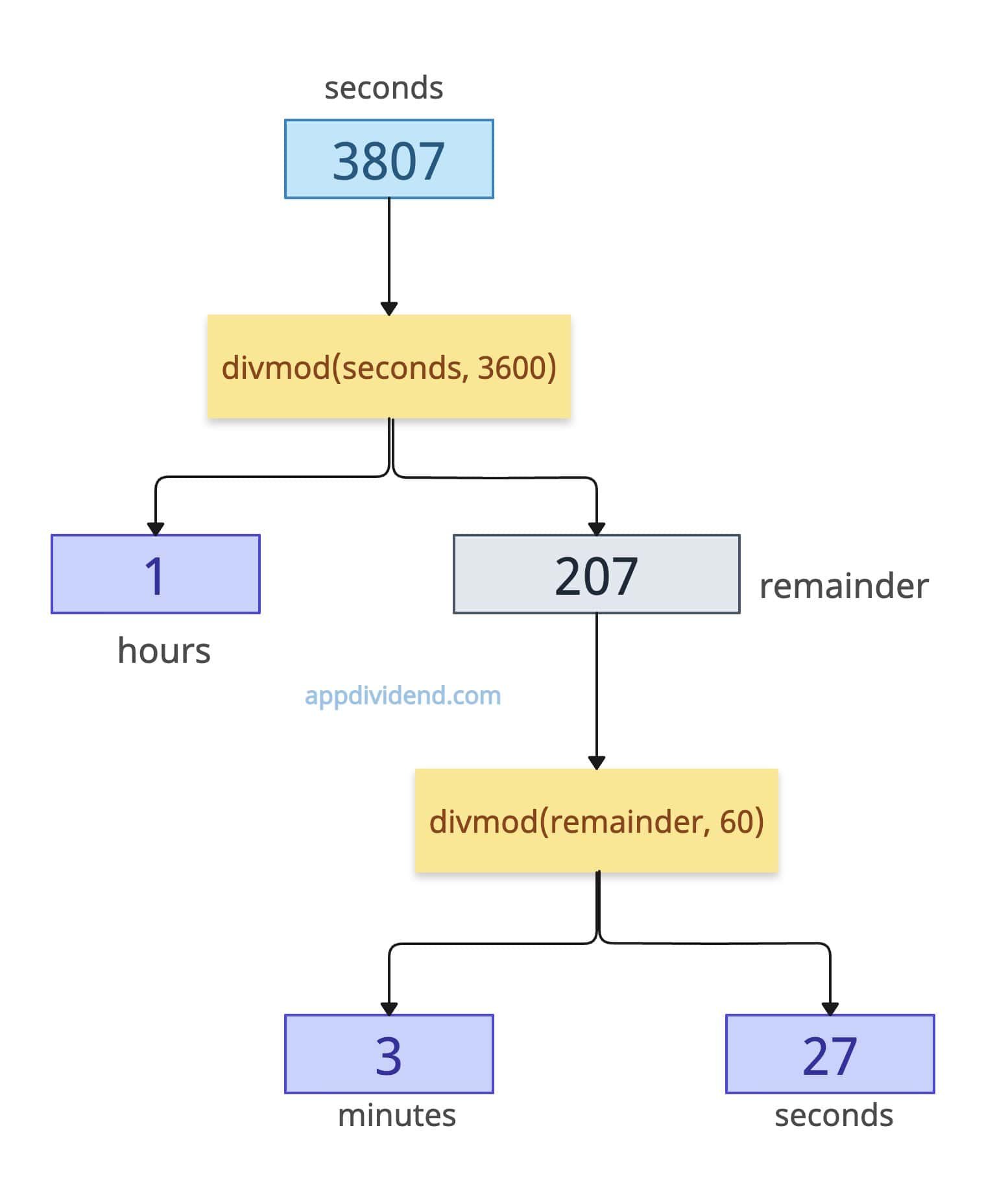
The most efficient and cleanest way to convert seconds to hours, minutes, and seconds (hh:mm:ss) is using the built-in divmod() method.
The divmod() returns a tuple containing the quotient and the remainder of their division.
def seconds_to_hms(seconds):
    hours, remainder = divmod(seconds, 3600)
    minutes, seconds = divmod(remainder, 60)
    return hours, minutes, seconds


total_seconds = 3807
h, m, s = seconds_to_hms(total_seconds)

print(f"{h:02d}:{m:02d}:{s:02d}")

# Output: 01:03:27
In this code, we created a custom function that accepts seconds as an argument and used the divmod() function in the first phase to get the hours and the remainder.
In the second phase, we use the divmod() function to pass the remainder, and it returns the minutes and seconds.
The main advantage of the divmod() function is that you don’t need any imports to handle the quotient and remainder in one operation.
Method 2: Using datetime.timedelta
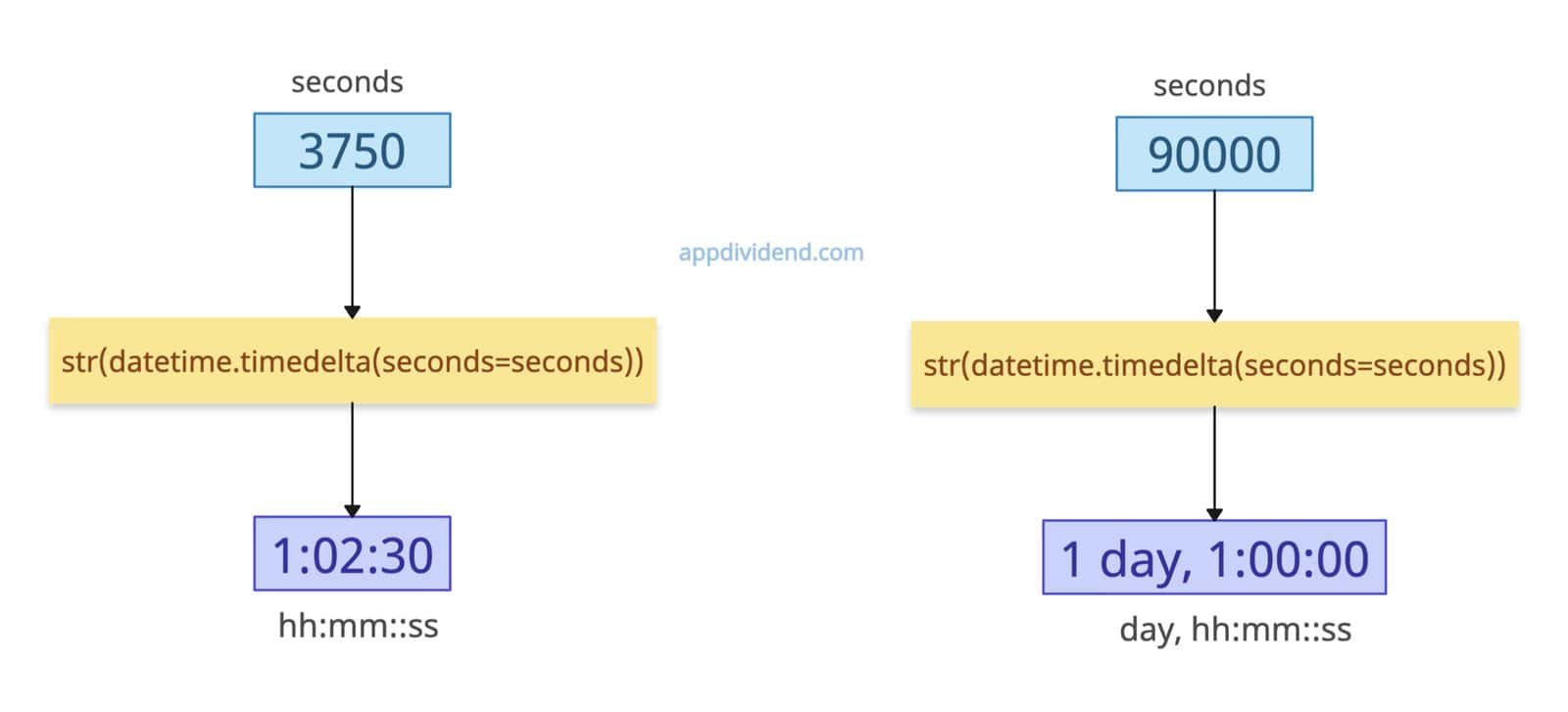
If you are already working with the datetime library and you need advanced time arithmetic, use the datetime.timedelta() method.
The main advantage of the timedelta() method is that if the input seconds is a large number, it will automatically convert into a day, and then hh::mm::ss format.
import datetime


def timedelta_conversion(seconds):
    return str(datetime.timedelta(seconds=seconds))


print(timedelta_conversion(3750))
# Output: 1:02:30

print(timedelta_conversion(90000))
# Output: 1 day, 1:00:00 (Automatically creates 'days' for large numbers)
From the second output, you can see that it automatically handled the days separately.
Method 3: Using strftime() with gmtime()
If you are building a media player or a stopwatch that will never exceed 23 hours, 59 minutes, and 59 seconds, this is a unique shortcut.
The time.gmtime() method converts the given number of seconds into a UTC tuple. We pass this tuple to the time.strftime() method, which formats a struct time into a string.
import time


def convert_to_hms(seconds):
    return time.strftime("%H:%M:%S", time.gmtime(seconds))


print(convert_to_hms(3750))
# Output: 1:02:30

print(convert_to_hms(90000))
# Output: 1:00:00 (It won't return days, only hours, minutes, and seconds)
As you can see, the second time our input is 90000 seconds = 25 hours = 1 day + 1 hour. So, this method wraps around and returns 01:00:00 because it treats the input as “Time of Day”, not “Duration.”
It is excellent when you want “HH:MM:SS” as a string, always in a 24-hour range.
Method 4: Native Approach
If you don’t want to use any functions, modules, or libraries, then basic mathematics returns you the hours, minutes, and seconds from the input seconds. It requires modulo, multiplication, and division operations.
def convert_to_hms(seconds):
    seconds = seconds % (24 * 3600)
    hour = seconds // 3600
    seconds %= 3600
    minutes = seconds // 60
    seconds %= 60

    return "%d:%02d:%02d" % (hour, minutes, seconds)


print(convert_to_hms(3750))
# Output: 1:02:30

print(convert_to_hms(90000))
# Output: 1:00:00 (It won't return days, only hours, minutes, and seconds)
In this code, we created a custom function that accepts a number of seconds as an argument.
The seconds % (24 * 3600) means a single day has 86400 seconds. Here, the modulo removes all complete days.
The expression seconds // 3600 performs integer division, returning the number of hours in the given seconds.
The seconds % 3600 calculates the remaining seconds after extracting hours.
The seconds // 60 calculates how many minutes are in the remaining seconds.
The seconds % 60 returns the remaining seconds after extracting minutes.
The main disadvantage of this approach is that if it is >24 hours, it will fail. So, don’t use it as this can mislead you in specific scenarios.
That’s all!

