
The date object only contains date-like (YYYY-dd-mm), and the datetime object contains date + time. Converting a date to a datetime adds a time component to the date object, which can be helpful when you require datetime precision.
Here are a few ways for the conversion:
Method 1: Using datetime.combine() with a time Object
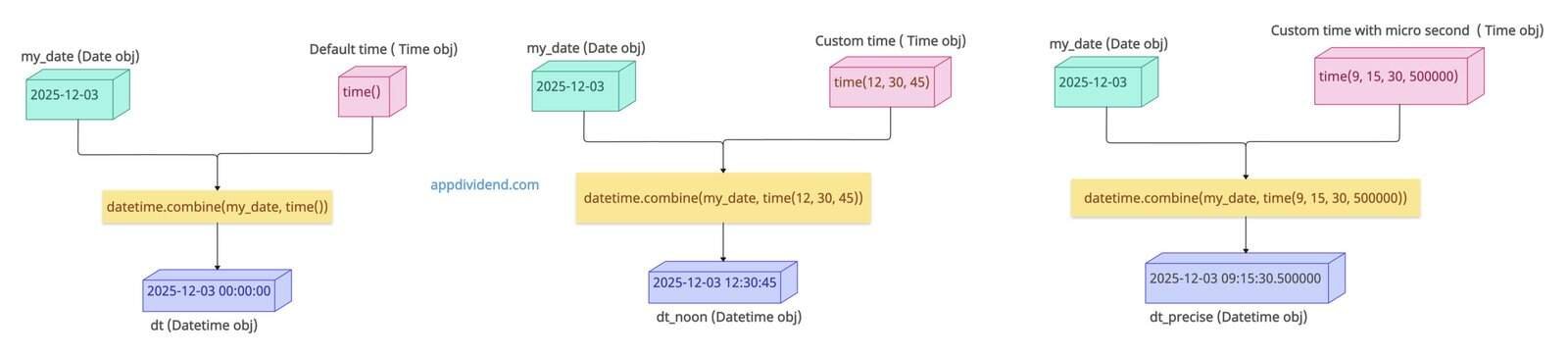
The most efficient and easiest way to convert a date object into a datetime object is to use the datetime.combine() method with a specific time object.
When you need to define an explicit time component, always use the datetime.combine() method.
from datetime import date, datetime, time

my_date = date(2025, 12, 3)

# Basic conversion with midnight
dt = datetime.combine(my_date, time())
print(dt)
# Output: 2025-12-03 00:00:00

# With specific time
dt_noon = datetime.combine(my_date, time(12, 30, 45))
print(dt_noon)
# Output: 2025-12-03 12:30:45

# With microseconds
dt_precise = datetime.combine(my_date, time(9, 15, 30, 500000))
print(dt_precise)
# Output: 2025-12-03 09:15:30.500000
In this code, we created a date object using the date() function.
In the first conversion, we used a datetime.combine() function accepts only two arguments: a date object and a default time, generated by the time() function. It returns a datetime object with the date and a default time of 00:00:00.
The main advantage of .combine() method is that you can set whatever time you want based on your requirement.
Timezone-aware conversion
If you are working with different time zones, pass the ZoneInfo argument from the zoneinfo module as the third argument to the datetime.combine() method. First, import the zoneinfo module as well with datetime module.
from datetime import date, datetime, time, timezone
from zoneinfo import ZoneInfo

main_date = date(2025, 11, 27)

# UTC timezone
dt_utc = datetime.combine(main_date, time(), timezone.utc)
print(dt_utc)
# Output: 2025-11-27 00:00:00+00:00

# Specific timezone (requires Python 3.9+)
dt_ny = datetime.combine(main_date, time(), ZoneInfo("Asia/Kolkata"))
print(dt_ny)
# Output: 2025-11-27 00:00:00+05:30
In this code, in the first example, we just passed timezone.utc as the third argument to define a timezone, which is one way to go about it.
However, in Python 3.9+, you can import the built-in zoneinfo module and use the ZoneInfo() function to define a specific time zone.
In our case, it is the Indian time zone. So, we passed that and returned the datetime object in Indian time.
Method 2: Using the direct datetime() Constructor
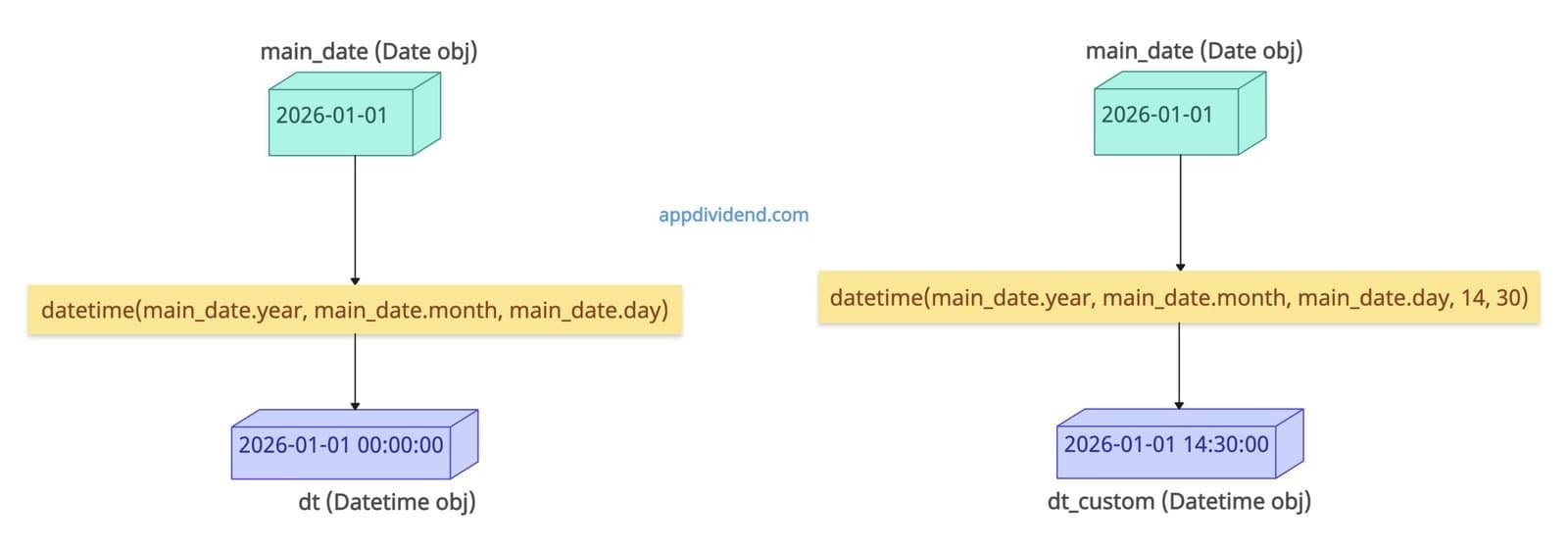
If you want to rebuild datetime from components, you can use the datetime() constructor and pass the various date and time parts.
from datetime import date, datetime

main_date = date(2026, 1, 1)

# Extracting components and create datetime
dt = datetime(main_date.year, main_date.month, main_date.day)

print(dt)
# Output: 2026-01-01 00:00:00

# With additional time components
dt_custom = datetime(main_date.year, main_date.month, main_date.day, 14, 30)

print(dt_custom)
# Output: 2026-01-01 14:30:00
In this code, we created a date object and then passed its parts to the datetime() constructor; by default, it returns a datetime object with 00:00:00 time.
If you want a custom time, pass the custom time components as well, like 14 hrs, 30 minutes, and 00 seconds. That is why the second output is 2026-01-01 14:30:00.
Use this approach only when you have different date and time components.
Method 3: Using datetime.strptime() with strftime()
What if you want to parse a string date or integrate with external date formats while converting to datetime? In that case, use the combination of datetime.strptime() and .strftime() methods.
from datetime import date, datetime

main_date = date(2025, 11, 27)

dt = datetime.strptime(main_date.strftime("%Y-%m-%d"), "%Y-%m-%d")

print(dt)

# Output: 2025-11-27 00:00:00
In this code, we first defined a date object using the date() constructor. Since it is a date object, strptime() accepts a string argument, not an object.
So, we need to use .strftime() to convert a date object to a string before parsing it back into a datetime object, and then use .strptime() to get the final datetime object.
Method 4: Using pandas.to_datetime()
When you are working with Pandas Series or DataFrame, you can use the pandas.to_datetime() method. It is always best for large datasets, CSV imports, Excel files, and ETL pipelines.
import pandas as pd
from datetime import date

d = date(2025, 12, 4)

dt = pd.to_datetime(d)

print(dt)

# Output: 2025-12-04 00:00:00
The .to_datetime() method accepts a date object and returns a datetime object.
That’s all!

