

Finding common elements between two lists involves identifying items that appear in both collections.
Method 1: Using Set Intersection
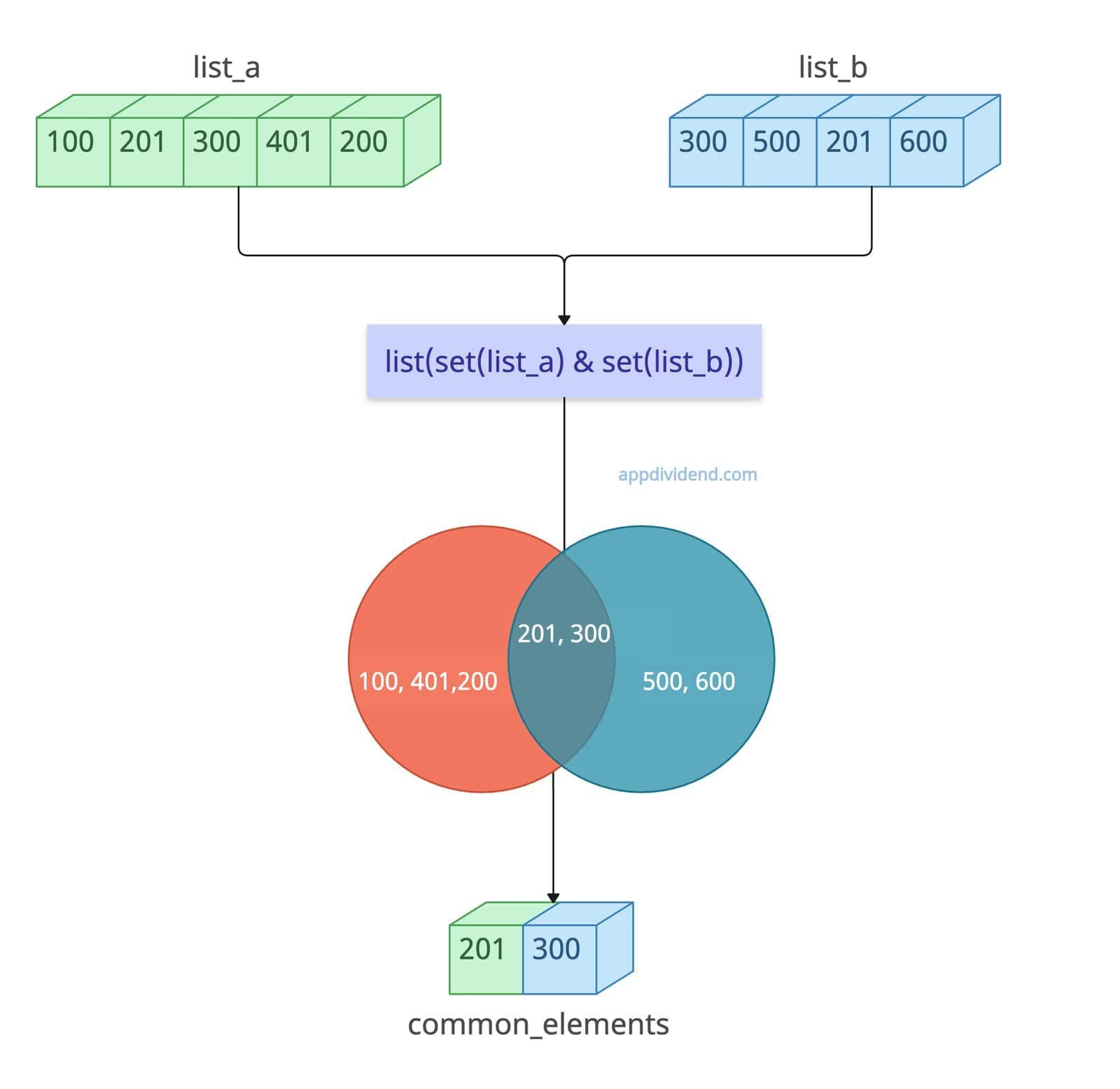 The most efficient and performant way to find and print all common elements from two lists in Python is to use the built-in & operator, which implements set intersection.
The & operator is used in a Set, not a list, and we currently have two input lists. So, we will convert both lists to a set using the set() constructor, apply the & operator to them to find the common elements, and use the print() method to print the result to the console.
list_a = [100, 201, 300, 401, 200]
list_b = [300, 500, 201, 600]

# Using set intersection to find common elements
common_elements = list(set(list_a) & set(list_b))

print(common_elements)

# Output: [201, 300]
From list_a and list_b, the two elements 201 and 300 are common. It can handle large, unsorted lists efficiently because O(n + m) time (hashing is average O(1) per element), O(n + m) space.
However, this approach has disadvantages, such as not guaranteeing the preservation of element order. It also removes duplicates from the elements because we are converting a list to a set.
Unhashable values
Since we are converting the list to a set, the set cannot contain unhashable values. So, if you have a list of lists, it won’t work.
unhashable_a = [[1], [2]]
unhashable_b = [[2], [3]]

# Using set intersection to find common elements
common_elements = list(set(unhashable_a) & set(unhashable_b))

print(common_elements)

# Output: TypeError: unhashable type: 'list'
Method 2: Using List Comprehension
The main advantage of list comprehension is that it allows unhashable elements in the list and manages to find the common elements between two lists.
unhashable_a = [[1], [2]]
unhashable_b = [[2], [3]]

# Using list comprehension to find common elements
common_elements = [x for x in unhashable_a if x in unhashable_b]

print(common_elements)

# Output: [[2]]
In this code, the inner list [2] is the element that appears in both outer lists and is the common element between them.
You can see that the order is preserved, works for unhashable elements, and it is not complex to understand.
Method 3: Using filter() with Lambda and Set
If you are looking for a functional approach, you can use this approach. In this way, use the filter() method with a lambda to test membership in a set, then convert the list to a string for printing. Emphasizes immutability.
a = [11, 11, 21, 31]
b = [11, 21, 21, 41]

common_elements = list(filter(lambda x: x in b, a))

print(common_elements)

# Output: [11, 11, 21]
If you analyze the output, we get 11 two times, but why? In the first iteration, it checks that list a has 11 and list b has 11, so 11 is common and hence appears in the final output list.
In the second iteration, the second element of list a is also 11, and list b’s first element is 11, so again, 11 appears in both lists, hence our final list’s second element is 11. The same for 21 and 31: it does not appear in list b, so it is not included in the final common_elements list.
That’s all!

